
Local rank tracker for iPhone
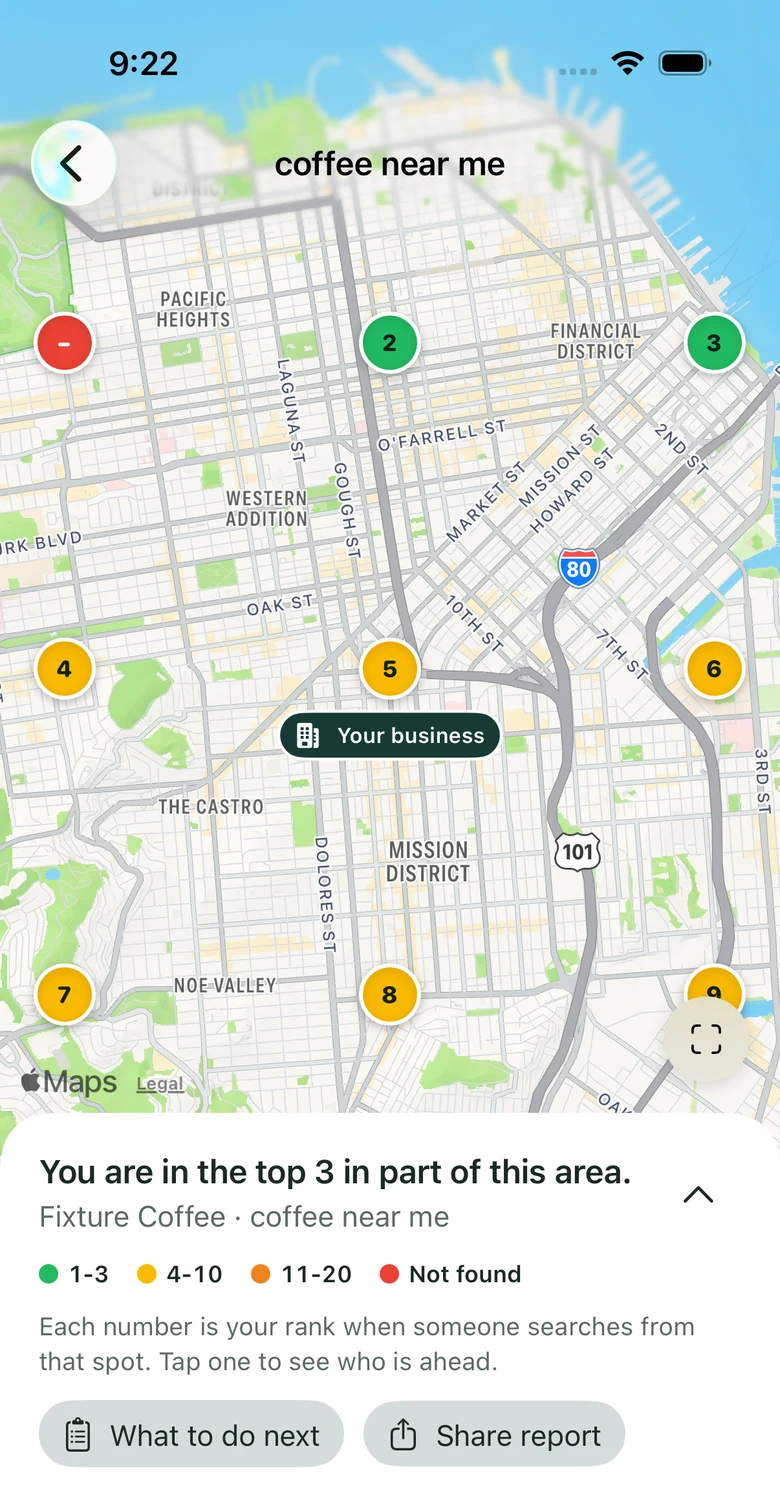
Streetfinch tracks where your business ranks on Google Maps for the searches your customers use. Each check searches from 9 spots around you, and repeat checks show whether you are moving up or down. It is an iPhone app. Your first 3 checks are free, and you do not need an account.

What a local rank tracker does
A local rank tracker records where your business appears when people search nearby, and keeps that record so you can compare it later. For most local businesses, the search that matters is Google Maps, where the top 3 results get most of the attention.
A single rank number is not enough, because local results change with where the searcher is standing. You might be second for someone outside your door and not listed at all for someone a mile away. A useful tracker checks from several spots, so you can see where you are strong and where you are missing.
How tracking works in Streetfinch
- Add your business. Search by name and confirm it is the right Google Maps listing. You can keep several businesses in one list.
- Pick a search phrase. Use what customers type, such as “dentist near me” or “emergency plumber”, not your business name.
- Choose how far out to look. Neighborhood is about 1.5 miles, Town is about 5 miles and Region is about 15 miles.
- Run the check. The app shows the cost before you start, and a map with your rank at each spot is usually ready in under a minute.
- Check again later. Run the same phrase again in a few weeks. Streetfinch draws the trend and puts your first check next to your latest one.
Each numbered pin on the map is your rank from that spot. Green is the top 3, yellow is 4 to 10, orange is 11 to 20 and red means you were not found. Tap a pin to see who ranks above you there. Streetfinch also lists the businesses that beat you most often across the whole area.
What the trend tells you
Google results move by the hour and by the person searching, so one check is a snapshot. The trend is the useful part. If you add photos, answer reviews or fix your categories, a repeat check shows whether your rank changed, and where on the map it changed.
Your businesses list puts the ones that slipped since their last check first, so you can see which one needs attention.
Automatic checks with Pro
With Streetfinch Pro, checks run weekly or monthly and you get an alert when a rank changes, so you do not have to remember to run them. Pro also adds larger checks from 25 or 49 spots and PDF reports with your own name and logo, which suits anyone who looks after local businesses for clients. Any check can also be shared as a PDF without Pro.
What it costs
- The app is free to download, and your first 3 checks are free.
- After that, one credit runs one check from 9 spots. Credit packs are 10 credits for $9.99 or 50 credits for $39.99, and they do not expire.
- Streetfinch Pro is $29.99 a month or $249.99 a year. It includes 200 credits every month, larger checks from 25 or 49 spots, automatic checks with alerts and reports with your name and logo.
This is launch pricing. Purchases are made in the app through Apple.
What Streetfinch does not do
Streetfinch is an iPhone app, so there is no web version or Android app. It tracks Google Maps rankings, not your website’s position in regular Google search. It shows where you rank. It does not change your Google Business Profile and cannot promise a better position.
If you are not showing up at all, read why your business is not showing up on Google Maps. For a single check with a map, see the Google Maps rank checker.
Streetfinch is an independent app. It is not affiliated with or endorsed by Google.