
Google Maps rank checker for iPhone
Streetfinch checks where your business ranks on Google Maps for one search phrase, from 9 spots around your business, and puts each rank on a map. It is an iPhone app. Your first 3 checks are free, and you do not need an account.

Why searching on your own phone is not enough
Google Maps ranks local businesses partly by how far each one is from the person searching. A customer two miles north of you does not see the same list as one standing outside your door. When you search from your shop, you see the results for your shop’s exact spot, so you will usually look better than you do for most of your customers.
A rank checker searches from several spots at once. You see where you are in the top 3, where you slip down the list and where you do not appear at all.
How to check your Google Maps ranking with Streetfinch
- Find your business. Search by name and confirm it is the right listing on Google Maps.
- Type what customers search for. Use the service you offer, such as “dentist near me” or “emergency plumber”, not your business name. People who already know your name will find you. New customers search for the service.
- Choose how far out to look. Neighborhood is about 1.5 miles, Town is about 5 miles and Region is about 15 miles.
- Run the check. The app shows the cost before you start, and the map is ready in about a minute.
What the map shows
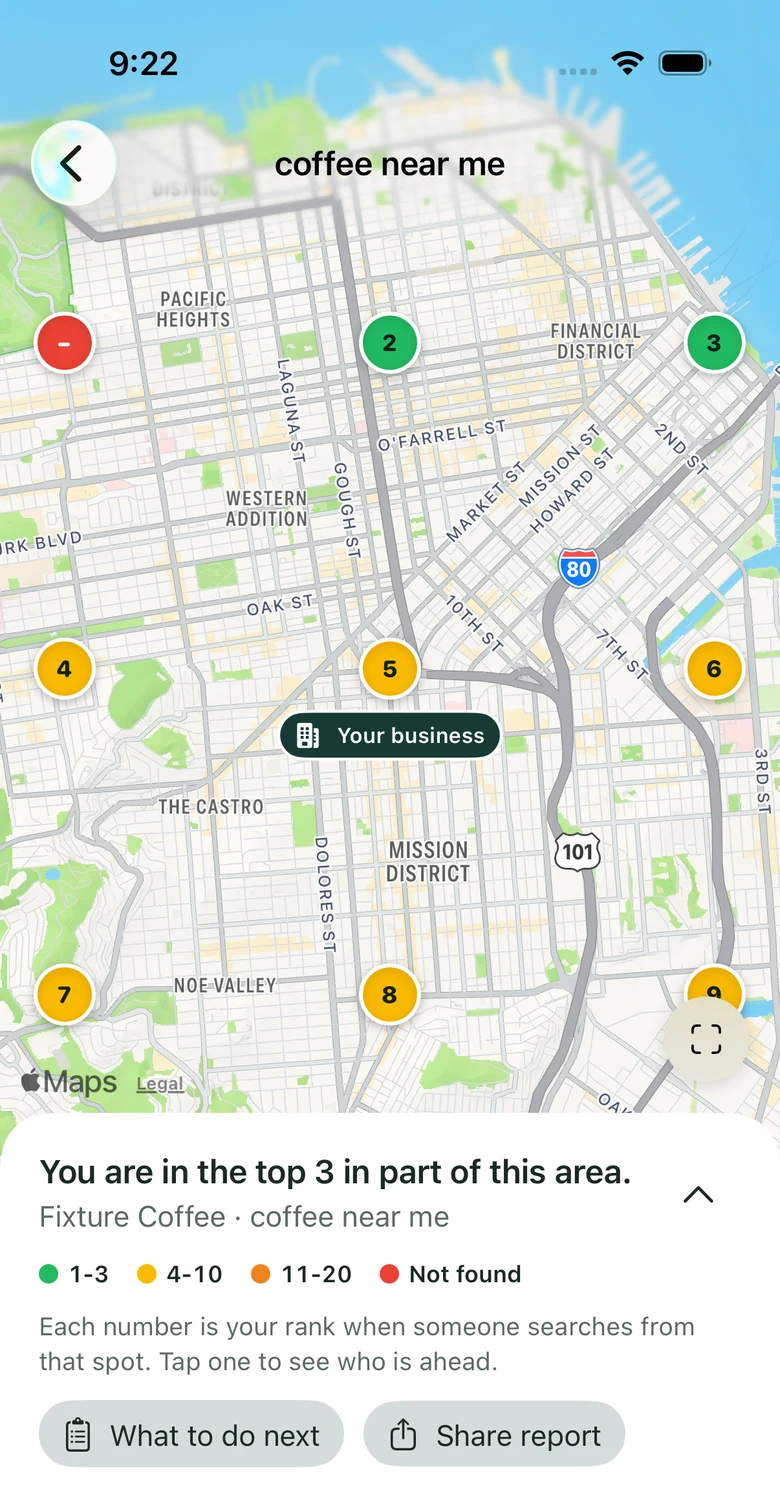
Each numbered pin is your rank when someone searches from that spot.
- Green: top 3.
- Yellow: 4 to 10.
- Orange: 11 to 20.
- Red: not found in the results checked.
Above the map, one sentence sums it up, such as “You are in the top 3 in part of this area”, and says where you are strongest and weakest. Tap any pin to see who ranks above you there. Streetfinch also lists the businesses that beat you most often across the whole area.
Check again to see the trend
One check is a snapshot. Google results change by the hour and by the person searching. Run the same phrase again in a few weeks and Streetfinch draws the trend (see how it works as a local rank tracker) and puts your first check next to your latest one. That is how you tell whether a change you made, such as adding photos or asking for reviews, is helping.
You can also share any check as a PDF report, which is useful if you look after local businesses for clients.
What it costs
- The app is free to download, and your first 3 checks are free.
- After that, one credit runs one check from 9 spots. Credit packs are 10 credits for $9.99 or 50 credits for $39.99, and they do not expire.
- Streetfinch Pro is $29.99 a month or $249.99 a year. It includes 200 credits every month, larger checks from 25 or 49 spots, automatic checks with alerts and reports with your name and logo.
This is launch pricing. Purchases are made in the app through Apple.
What Streetfinch does not do
Streetfinch shows where you rank. It does not change your Google Business Profile and cannot promise a better position. If you are not showing up at all, read why your business is not showing up on Google Maps.
Streetfinch is an independent app. It is not affiliated with or endorsed by Google.